HETS Policy Changes
Last updated: June 11, 2026
This article will guide you through the CMS HETS Medicare changes and what needs to be done to address any disruption to Medicare checks in exacare ai.
Overview of HETS Policy
The Centers for Medicare & Medicaid Services (CMS) is implementing a new security protocol within HETS (HIPAA Eligibility Transaction System) that requires facilities to explicitly authorize their clearinghouses in their Medicare Administrative Contractor (MAC) portals.
This is a federal CMS requirement affecting all healthcare facilities using Medicare eligibility verification. To see more details, please visit the CMS website.
Full enforcement begins on May 11, 2026.
What is Impacted
Without authorization, Inovalon (exacare ai's clearinghouse partner for Medicare) will be unable to process HETS eligibility checks. When you attempt to run a Medicare check in exacare, the system will return an AAA 41 error, preventing you from verifying Medicare coverage for your patients.
Who this affects
Any facility using the insurance eligibility verification feature for Medicare patients
What won't change
The insurance verification experience will remain the same for all other payers. This only ensures the continued functioning of Medicare eligibility checks
Once Completed: No changes to how you currently use the insurance verification check once authorization is complete
What Needs to be Done
Per CMS requirements, each of your facilities must log into their designated MAC portal (Noridian, Novitas, Palmetto, etc.) and complete a one-time HETS EDI Attestation to authorize Inovalon (Unique ID: VQAS) as an approved clearinghouse for Medicare Part A.
Who should complete this
Someone at your facility with an existing MAC portal account
Must be listed as an Authorized Official (AO) or Delegated Official (DO) in your PECOS enrollment
MAC Jurisdictions
While MAC assignments are generally based on your facility's state but this is not always the case. Chain facilities or those with recent ownership changes may be assigned to a different MAC portal.
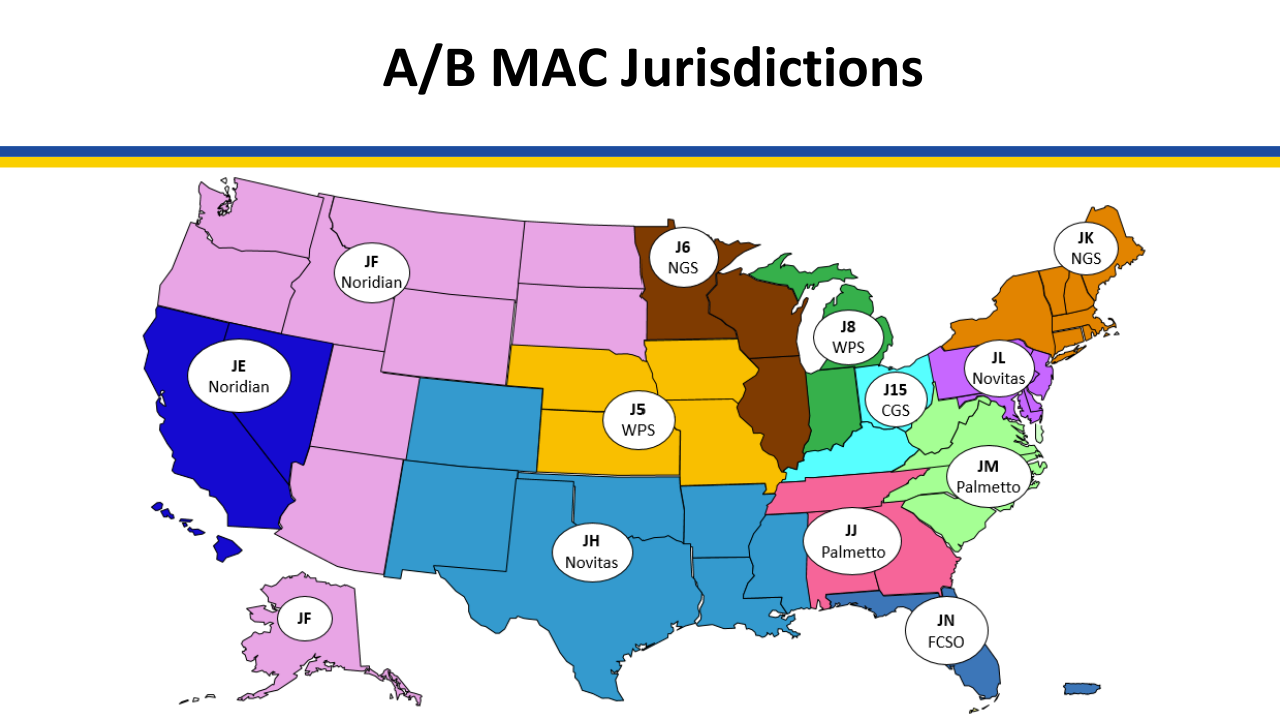
These assignments may not apply in all cases. If you're unsure which MAC portal to use or your expected portal login doesn't work, verify your assignment by looking up your facility's NPI in the CMS PECOS system. (See FAQ: What if I don't know what MAC Portal to use?)
MAC Portal Guides
Below are step-by-step guides for submitting the HETS EDI Attestation in each MAC portal. Select the guide that matches your facility's MAC assignment:
FCSO (FL)
Palmetto JM (WV, VA, NC, SC)
Palmetto JJ (TN, AL, GA)
CGS (OH, KY)
WPS (NE, IA, KS, MO, MI, IN)
NGS (MN, WI, IL, NY, CT, RI, MA, VT, NH, ME)
Novitas JH (CO, NM, TX, OK, AR, LA, MS)
Novitas JL (PA, MD, DC, DE, NJ)
Noridian (CA, NV, HI, AK, WA, OR, ID, MT, WY, UT, AZ, ND, SD)
CMS HETS Policy FAQ
Q: When did this change take effect?
CMS began full enforcement on May 11, 2026. If you haven't completed authorization yet, complete it immediately to restore Medicare eligibility checks on exacare ai.
Q: What error will I see if I haven't completed this?
You'll receive an AAA 41 error (Authorization/Access Restrictions) when attempting to run Medicare eligibility checks in exacare.
Q: What if I don't know what MAC Portal to use?
MAC portal assignments are typically based on your facility's state, but chain facilities or those with recent ownership changes may be assigned differently.
Start with the CMS MAC jurisdiction map to find your expected MAC portal. If your login doesn't work or you can't access that portal, verify your actual MAC assignment in PECOS:
Log in to PECOS
Click "My Associates" from the main dashboard
Find your facility's NPI and click "View Enrollments"
Click "View Medicare ID Report" to see your MAC assignment and associated PTAN
Note: Chain facilities often report to a single MAC portal regardless of where facilities are physically located.
Q: What if I don't know what PTAN or NPI to use?
Your facility may have multiple PTANs and NPIs, especially if you've changed ownership or operate multiple service lines. To find the correct PTAN for Medicare Part A:
Log in to PECOS
Click "My Associates" from the main dashboard
Find your facility's NPI and click "View Enrollments"
Click "View Medicare ID Report"
This report lists every active PTAN linked to that NPI, along with the specific practice location address for each. Look for your Medicare Part A PTAN that corresponds to your SNF facility.
Q: Do I need to do this for Medicare Part B?
No, only the Part A attestation is required as skilled nursing facilities are classified as Medicare Part A providers. If you notice any impacts to Part B access, please contact exacare support.
Q: What if my PTAN comes back as invalid?
An invalid PTAN error typically means one of two things:
Incorrect MAC Portal: You're submitting to the incorrect MAC portal for your facility. Use the PECOS lookup steps above to verify your correct MAC assignment.
PTAN Not Enrolled: Your PTAN hasn't been enrolled with Medicare yet. This can happen after a recent Change of Ownership (CHOW) or if your facility is newly opened.
Q: What if I don't know who should submit?
To verify who is authorized to submit, follow these steps:
Log in to PECOS, go to "My Associates," find your facility's legal name, and click "View Enrollment"
Open the PTAN enrollment and click "View Approved Enrollment Record"
Scroll to Section 6 to see who is listed as an Authorized Official (AO) or Delegated Official (DO)
Only individuals listed as AO or DO can complete the HETS attestation for your facility.
Q: Can I have more than one clearinghouse on my MAC portal?
Yes! Facilities can authorize multiple clearinghouses for Medicare.
Q: My facility recently changed ownership. What should I do?
After a Change of Ownership (CHOW), your NPIs may not be registered with Medicare yet under the new ownership. Verify your current NPI and PTAN status in PECOS before attempting the attestation. If your PTAN shows as invalid, it may need to be enrolled in the Medicare system.
Q: I've completed my HETS attestations, why am I still getting errors?
If you're still seeing AAA 41 errors after completing your HETS attestation, there are a few possible reasons:
1. Confirm that the NPI is active
Look up NPI in the public NPPES registry: https://npiregistry.cms.hhs.gov
The record should show Active status with current organization name, address, and contact info
If the NPI is deactivated or information is out of date, update it through NPPES: https://nppes.cms.hhs.gov
2. Confirm your PTAN and Medicare enrollment are active
Sign in to PECOS: https://pecos.cms.hhs.gov
Open My Enrollments and confirm the enrollment record shows Approved
Check the revalidation due date. If it is overdue or imminent, complete revalidation before attesting
Confirm your PTAN is listed on the enrollment record