2. How to Send an Outbound Referral
Last updated: September 8, 2026
When to use this article
Use this when you need to send a referral out of exacare - the opposite of receiving a referral in your Screener. Outbound Referrals replaces the email, fax, and PDF workflow you may be using today. It keeps documents, dates, status, and messages with the receiving facility in one place.
You can send a referral for any recipient type: Dialysis, Home Health, Hospice, Skilled Nursing Facility (SNF), Long-Term Acute Care (LTAC), Equipment, or Other.
You can send to two kinds of recipients:
Facilities that use exacare
Facilities that don't use exacare - they get a secure link by email and don't need an exacare account
Before you start
Make sure:
You have an exacare account with access to the Screener or the Outbound tab
You know the referral type and the date you expect the patient to move in for care
If the receiving facility isn't already showing up as a recipient, you know their contact information so you can add them yourself
Step-by-step instructions
There are two ways to start a new outbound referral.
Option 1: Start from the Screener (you already have the patient in front of you):
Open the Screener as you would for any inbound referral.
Find the patient you want to send out. Click the three-dot menu on their row.
Click Send outbound referral.
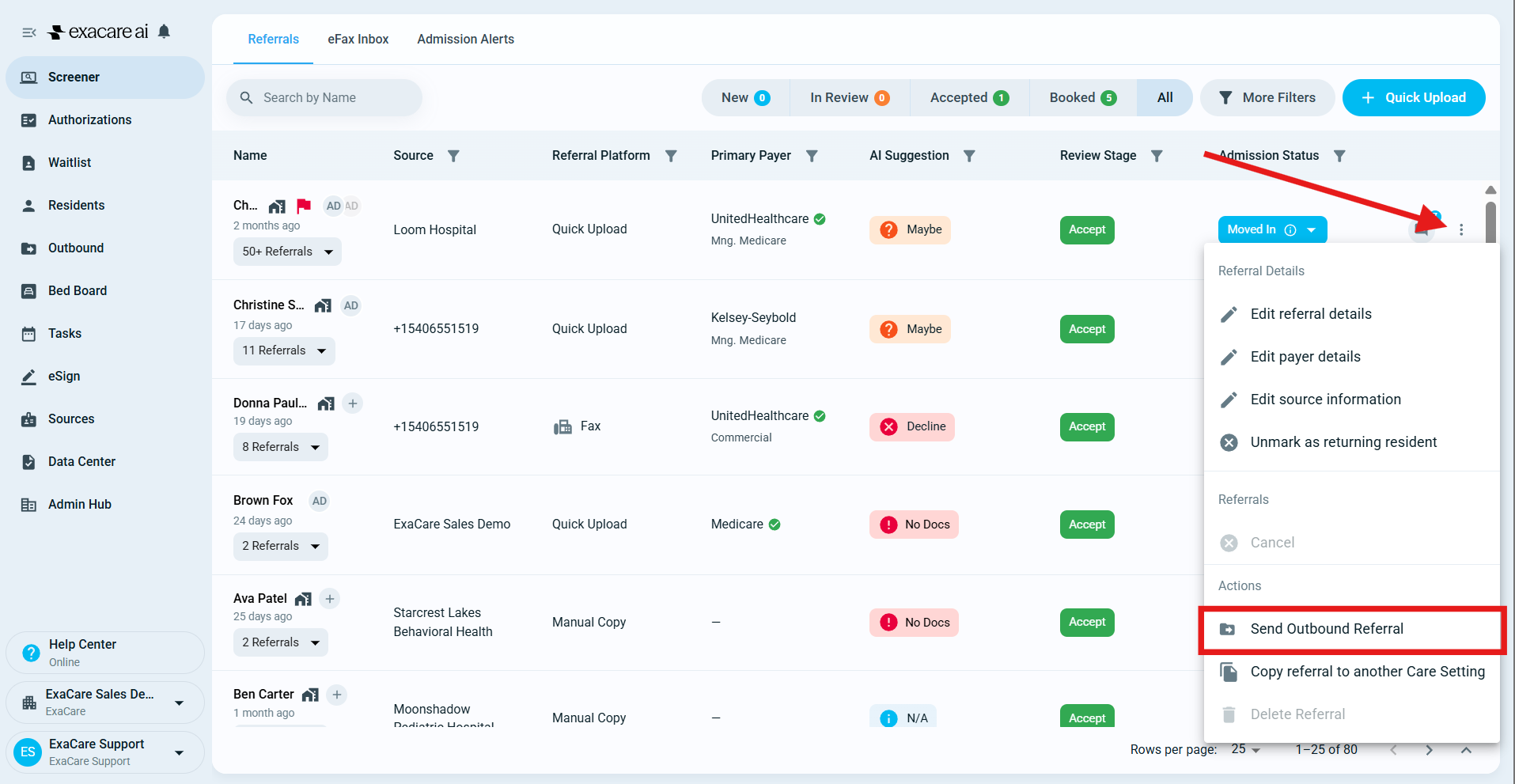
Option 2: Start from the Outbound tab (start blank, pick the patient inside the flow):
Click the Outbound tab in the left-hand navigation.
Click + Create outbound referral in the top right.
Pick the resident from the list inside the flow.
Both options open the same four-step flow:
Referral type: Pick Dialysis, Home Health, Hospice, SNF, LTAC, Equipment, or Other.
Outbound date: Pick the date you expect the patient to move in for care. Click Next.
Recipient: Pick one recipient facility from the list. If your recipient isn't listed, go to the Outbound tab and click Configure recipients to search the Provider Directory and add it yourself - no ticket needed.
Documents: The admission packet (face sheet, H&P, recent results) is pre-attached. Add or remove documents as needed, or drop in additional PDFs if the recipient needs something extra.
Click Confirm and send. The referral sends immediately.
What happens next
After you send, the referral appears in your Outbound tab, alongside every other referral you've sent. From there you can:
See patient name, recipient, date, status, and document count at a glance
Open a chat thread with the recipient on that specific referral, with read receipts - click the patient's name in the row on the Outbound grid to open it
See an activity log of every status change, message, and document upload, timestamped
Upload additional documents at any time - the recipient sees them immediately
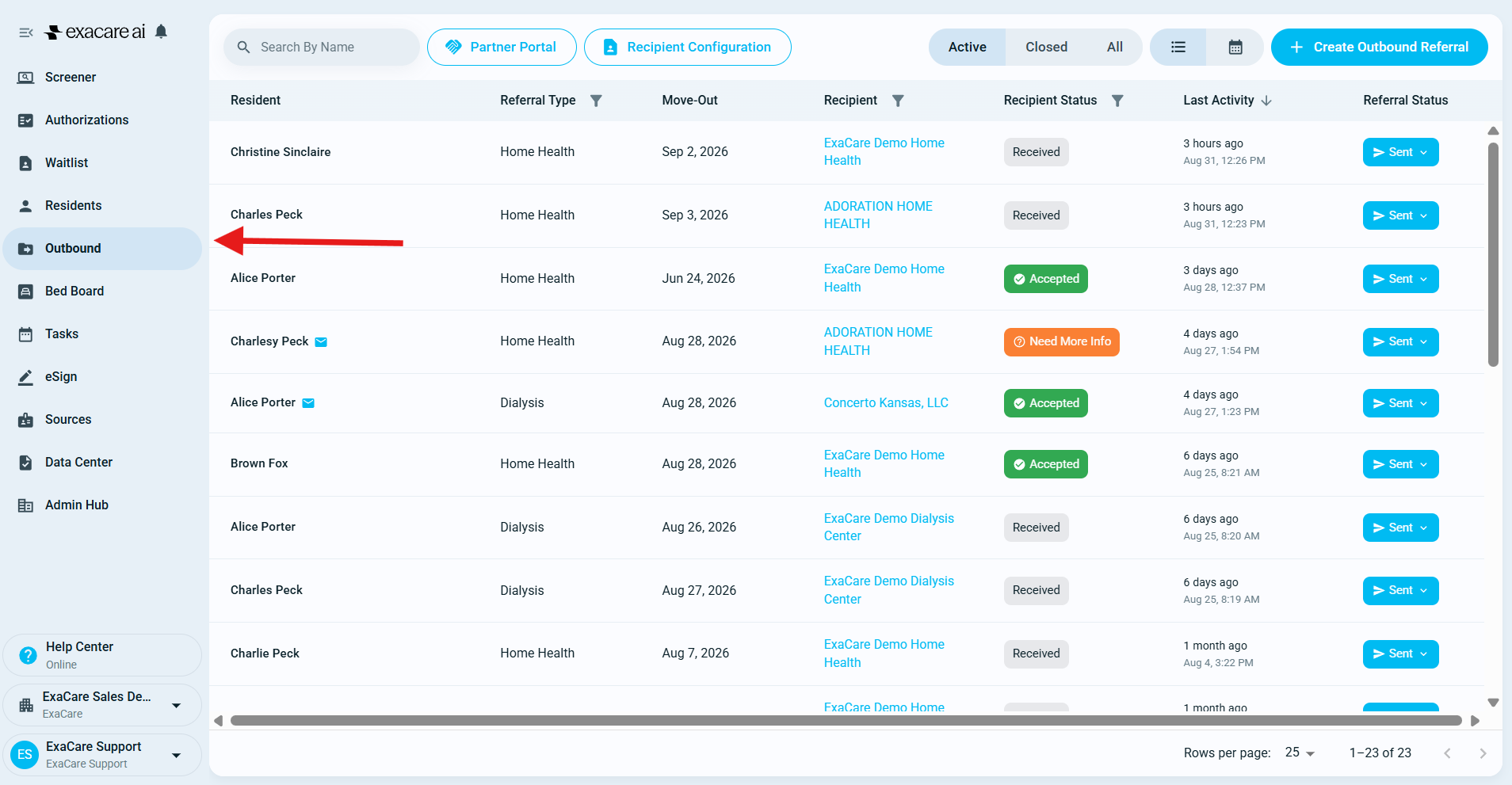
Status moves through Sent → Accepted → Booked → Closed, and updates flow both ways automatically:
The recipient sees your referral in their normal inbound Screener and works it the same way they would any other referral.
When they accept, decline, or change status, it updates on your side in real time - no manual follow-up needed.
Once they've accepted with an ETA, click Confirm placement to move the status to Booked.
Click Close once the patient is placed, declined, or the referral is no longer relevant.
If a patient is re-admitted from the hospital, send a new outbound referral - treat it the same way you would today.
FAQs
How do I add a recipient facility that isn't in the list?
Go to the Outbound tab and click Configure recipients. Search the Provider Directory and add the facility yourself.
What if the contact information for a facility I'm sending to isn't accurate?
Outbound Referrals uses the contact info saved in the Provider Directory; it doesn't pull from your EHR (such as PointClickCare or MatrixCare) automatically yet. Open Configure recipients, search for the facility, and update the contact details yourself. If the facility isn't in the directory at all, you can still add it as a new, custom facility with the contact info you have - you're not blocked. It's helpful to also let exacare Support know a facility was missing so we can add it more broadly.
Can I send one referral to multiple recipient facilities at once?
Not yet - today each referral goes to one recipient. To coordinate with more than one facility, send separate referrals. Multi-recipient (broadcast) sending is planned.
Does the outbound date sync with my bed board?
Not yet. The date you set in Step 2 is the source of truth today. Update it manually if plans change. Bed-board sync is on the near-term roadmap.
Will I be notified when the recipient responds or sends a message?
Yes. Notifications are available for outbound referral updates and messages, and you can configure them on your user notifications page.